
Leaving an anxious dog home alone is hard, and a good dog camera at least lets you see what is happening and speak up when it counts. The best dog cameras for separation anxiety pair a clear live view with two-way audio, motion and sound alerts, and a wide or moving field of view so your dog stays in frame. For most owners the Furbo 360 is the standout for its auto-tracking and interactive features, though a simple pan-tilt camera covers the basics well. A camera is a monitoring tool rather than a cure, so it works best alongside enrichment and, for real separation anxiety, guidance from a vet. Pairing one with the right calming bed and a calm departure routine tends to help more than any gadget alone.
Quick Verdict
The Furbo 360 is the best all-round pick for interaction, with auto-tracking and treat tossing that keep a dog engaged. Choose by what you need to do from your phone. Budget shoppers who want local storage should look at the Wyze Cam Pan, privacy-minded owners at the local-recording Tapo, and anyone who just wants to watch and talk at a simple compact camera. None of them treats anxiety on its own.
Why Trust This Guide
Selections draw on product research and manufacturer specs. First-person notes appear only where the gear was genuinely used. Pick two is the pan-tilt camera I keep in my own home to check on my dog, and those notes are my own. Where dog welfare is concerned, this guide keeps to general, non-medical guidance and points you to a vet for anything serious.
Key Takeaways
- A camera lets you watch, talk to, and sometimes treat your dog remotely, which helps you monitor and respond, but it does not by itself treat separation anxiety.
- Two-way audio reassures some dogs and unsettles others, so watch how yours reacts before relying on it.
- Subscriptions matter: live video and alerts are usually free, while AI barking detection and saved cloud clips often cost monthly.
- Local microSD recording keeps footage in your home and avoids ongoing fees, which is the privacy-friendly route.
- For genuine separation anxiety, a vet or veterinary behaviorist and a behavior plan do the real work, with the camera as support.
Disclosure: HappyPaws is reader-supported. As an Amazon Associate, we earn from qualifying purchases made through links on this page, at no extra cost to you.
Medical Disclaimer
This is general information about consumer products, not medical advice. Products described as hypoallergenic or allergen-reducing may lower exposure and do not treat allergy, asthma, or any other condition. Diagnosis and management belong with a doctor or an allergist.
How We Picked the Best Dog Cameras for Separation Anxiety
A dog camera earns its place by giving you a clear, reliable window into the room and a way to respond, without locking the basics behind a monthly bill. The goal is honest monitoring and gentle interaction, not a promise to fix anxiety. Every pick had to offer a sharp live view with night vision, two-way audio so you can hear and speak to your dog, useful motion or sound alerts, and a storage approach that suits either cloud convenience or local privacy, all from a current, widely sold model.
One pick is the pan-tilt camera I use at home, so it carries first-hand notes. The rest are chosen on view, interaction, alerts, storage, and value across different needs.
1. Furbo 360 Dog Camera: Best Overall
The camera that does the most for an anxious dog is the one that can follow, talk, and treat, and the Furbo 360 covers all three. Auto-tracking keeps a moving dog in frame while treat tossing turns a check-in into a small, positive event.
Why It Stands Out
The 360-degree view with auto-tracking keeps your dog on screen no matter where they wander, the treat toss lets you reward calm behavior from your phone, and the AI can flag barking so you know when your dog is genuinely worked up rather than just noisy. A clear day-and-night live view and easy setup round it out. For owners who want to interact, not just watch, it is the standout.
Worth Knowing
The most advanced AI alerts sit behind a paid plan, and the unit is bulkier than a compact camera. The treat tossing means refilling the canister, and you can pair it with treat-dispensing toys for variety.
Buy it if you want the richest remote interaction with your dog. Skip it if you only need a basic watch-and-talk camera or want to avoid any subscription.
2. The Pan-Tilt Camera I Use: What I Use
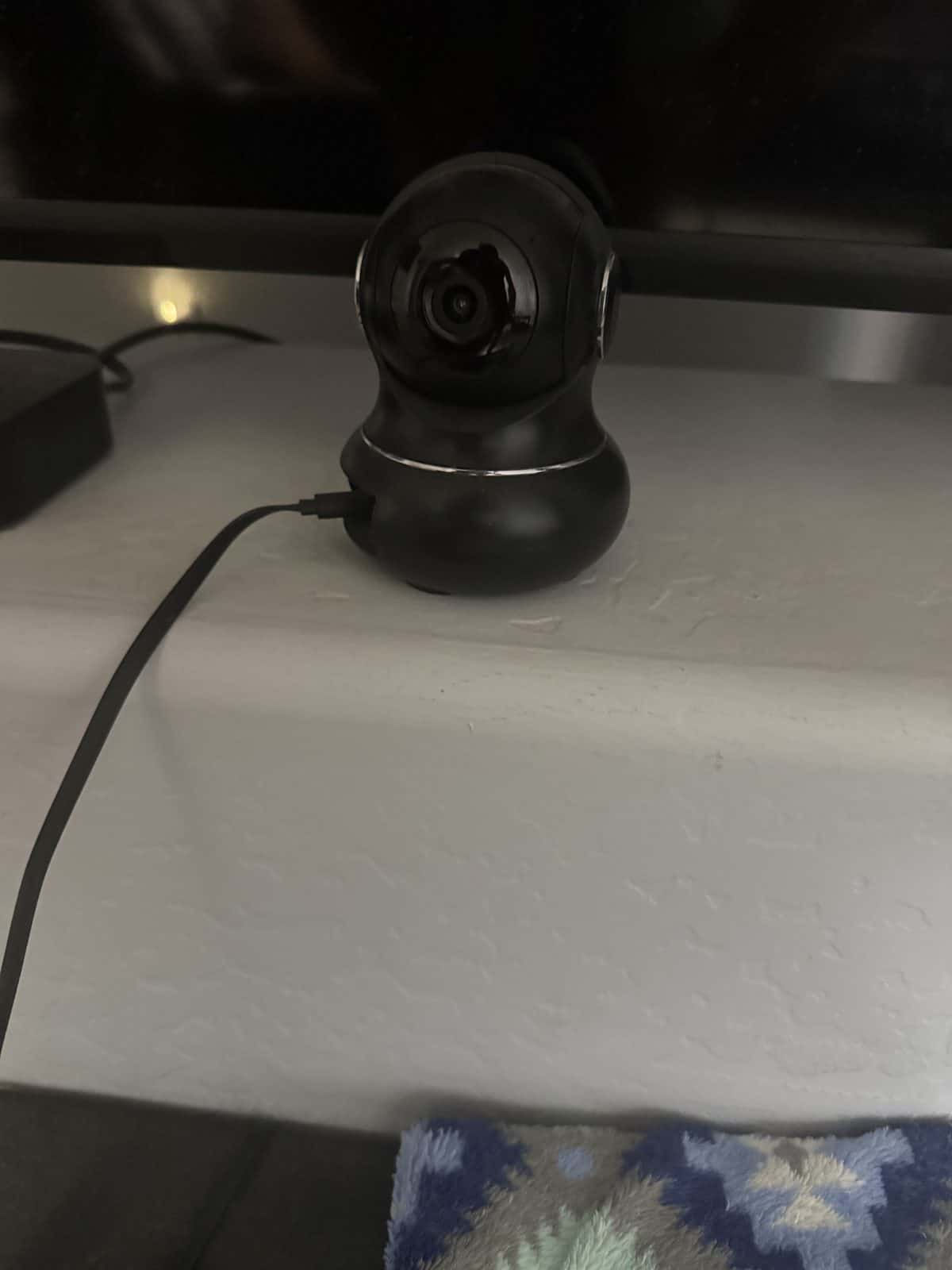
Pick two is the camera sitting in my own home. It is a simple black pan-tilt Wi-Fi camera that swivels to cover the room, runs off a USB cable, and sends me motion alerts, and I use it to check on my dog when I am out. Longer separations have their own aftermath, and coming home from boarding covers the first days back.
Why It Stands Out
The honest appeal here is that everything just works. The motion detector pings my phone when there is movement, the pan-tilt head lets me look around the room rather than at one fixed spot, and it was genuinely easy to set up and use with no fiddly steps. I have never had a single issue with it, which is more than I can say for a lot of smart-home gear, and being able to glance at my dog and see she is settled is exactly the peace of mind I wanted. It is a no-drama monitoring camera, and I lean on enrichment like puzzle toys to keep her busy while I am gone.
Worth Knowing
Mine is a plain pan-tilt camera with no treat dispenser and no legible brand, so I have not named it, and the button points to the same style of pan-tilt pet camera. It is a watch-and-monitor tool, not a fix for anxiety, so I treat it as one part of a wider routine rather than a solution on its own.
Reach for a simple pan-tilt camera like this if you want reliable monitoring and motion alerts without complexity. Pass if you specifically want treat tossing or AI behavior analysis.
3. Wyze Cam Pan v3: Best Budget
You do not need to spend much to get a capable moving camera, and the Wyze Cam Pan v3 proves it. It pans, tilts, and tracks a moving pet, and it records to a local card so you owe nothing monthly.
Why It Stands Out
For its low price it pans and tilts across the room, can follow a moving dog, and saves footage to a local microSD card with no subscription for basic recording. Two-way audio and night vision are included, and it is rated for some covered-porch exposure. For a first camera, a second angle, or anyone who wants local storage on principle, it is the value pick.
Worth Knowing
The app and AI are less polished than the premium brands, and there is no treat tossing or feeding. What you get is a genuinely capable pan-tilt camera that keeps your clips on a card at home.
Choose it for the most camera per dollar with no ongoing fee. Look elsewhere if you want refined AI alerts or remote treat tossing.
4. Petcube Bites 2 Lite: Best Treat-Dispensing
If rewarding calm behavior from afar appeals but the Furbo’s price does not, the Petcube Bites 2 Lite is the affordable treat-tosser. It pairs a wide view with a generous treat hopper at a friendlier price.
Why It Stands Out
The treat tossing lets you create positive moments while you are away, the wide field of view covers most of a room without a second camera, and night vision keeps it useful after dark. Treat dispensing works without a subscription, which keeps the running cost down. For budget-conscious owners who still want interaction, it hits the sweet spot.
Worth Knowing
The base is fixed rather than rotating, so it does not follow your dog the way the Furbo does, and its flatter shape is less stable on an open shelf. Motion and sound alert customization sit behind a paid plan.
Get it for affordable treat tossing and a wide view. Skip it if you want auto-tracking or a rotating lens.
5. TP-Link Tapo C120 2K: Best Video Quality and Privacy
When you want the sharpest picture and your footage to stay home, the Tapo C120 is the pick. Its 2K video is noticeably crisper than the usual 1080p, and it records to a local card with no subscription.
Why It Stands Out
The 2K resolution with pinch-to-zoom lets you really see what your dog is doing, and local microSD recording keeps your clips in the house without a monthly fee. Two-way audio, solid night vision, and a responsive app round it out, and a privacy mode lets you disable the lens when you are home. For privacy-minded owners, it is the standout.
Worth Knowing
It leans toward security-camera features rather than pet extras, so there is no treat tossing. As with any indoor camera, point it at your dog’s area and secure the account well.
Choose it for the best image quality and local, private storage. Pass if you want pet-specific extras like treats.
6. Blink Mini 2: Best Simple and Compact
Sometimes you just want a tiny camera you can drop anywhere and check from your phone. The Blink Mini 2 is a general indoor camera that doubles as a capable, no-fuss pet monitor.
Why It Stands Out
It is small enough to place almost anywhere, with motion detection, two-way audio, and a live feed that work without a subscription for the basics. Setup is quick, the image quality is solid, and it includes wall-mount hardware. For a straightforward watch-and-talk camera at a low price, it is an easy choice.
Worth Knowing
It is not pet-specific, so there is no pan-tilt, treat toss, or pet-tuned AI. Saved cloud clips and extra features can involve a plan, so check what you actually need.
Get it for a cheap, compact, simple monitor. Move up if you want a moving lens or interactive treat features.
Dog Cameras at a Glance
| Camera | View | Interaction | Storage | Best for | Price band |
|---|---|---|---|---|---|
| Furbo 360 | 360 auto-track | Two-way, treat toss, AI bark | Cloud plan | Overall interaction | $140–$210 |
| Pan-tilt (what I use) | Pan-tilt | Motion alerts | Varies | Simple monitoring | $30–$60 |
| Wyze Cam Pan v3 | Pan-tilt, track | Two-way audio | Local microSD | Budget, no sub | $35–$50 |
| Petcube Bites 2 Lite | Wide, fixed | Two-way, treat toss | Cloud plan | Treat dispensing | $60–$80 |
| Tapo C120 2K | Pan-tilt, 2K | Two-way audio | Local microSD | Video and privacy | $30–$45 |
| Blink Mini 2 | Fixed, wide | Two-way audio | Cloud plan | Simple and compact | $30–$40 |
Prices and plan details change often, so read the bands as a guide and check the subscription terms before buying. Match the camera to what you actually need to do from your phone, then weigh storage and cost.
How to Choose a Dog Camera for Separation Anxiety
Four things decide it: the field of view, whether you want to talk or treat, where the footage lives, and the quality of the alerts. Work through them and the right camera is clear.
Field of view and pan-tilt
A wide-angle or moving lens keeps your dog in frame as they pace or move between rooms, which matters with an anxious dog. A pan-tilt camera lets you look around from your phone, while a fixed wide-angle covers a single room simply. Match the coverage to your dog’s roaming and your room layout.
Two-way audio, used carefully
Two-way audio lets you hear the room and speak to your dog, which reassures some dogs and helps you call them over. For others, hearing your voice without you appearing can add to the distress, so try it and watch how your dog responds rather than assuming it will calm them. It is a tool to test, not a guaranteed soother.
Storage, subscriptions, and privacy
Live video, two-way talk, and motion alerts are usually free, while AI barking detection and saved cloud clips often cost a monthly plan. Cameras that record to a local microSD card keep footage in your home and avoid fees, the privacy-friendly route. Either way, use a strong unique password with two-factor authentication and aim the camera at your dog’s area.
Alerts and night vision
Motion and sound alerts turn a passive camera into one that tells you when something changes, and the better ones distinguish a distressed bark from ordinary noise. Night vision keeps the view useful in a dim room or after dark. Reliable alerts are what let you respond in time rather than discovering a problem hours later, much like pairing a camera with interactive toys that keep your dog occupied.
A Camera Is a Tool, Not a Cure
It helps to be clear-eyed about what a camera can and cannot do for separation anxiety. It is genuinely useful, but it is one piece of a bigger picture.
What a camera can do
A camera lets you see whether your dog settles or struggles when alone, respond with your voice or a treat, and spot problems like pacing, barking, or destructive chewing early. That information is valuable for managing the situation and for showing a professional what is happening. Combined with enrichment, a comfortable space such as a crate set up for calm, and a steady routine, it supports a calmer alone-time.
When to get professional help
Separation anxiety is a recognized behavioral issue that can cause real distress, and no camera treats it on its own. If your dog shows persistent panic, destruction, nonstop barking, accidents, or signs of hurting themselves when left alone, talk to your veterinarian or a qualified veterinary behaviorist. They can rule out other causes and build a behavior plan, with tools like anxiety wraps and calming aids as supporting comfort measures rather than fixes.
Common Dog Camera Mistakes to Avoid
A few predictable errors take the value out of a good camera. Each is easy to avoid.
Expecting the camera to fix anxiety
A camera shows you the problem and lets you respond, but it does not resolve separation anxiety by itself. Treat it as a monitoring and management tool alongside enrichment, routine, and professional guidance, not as the solution.
Overusing two-way audio
Talking to a dog who cannot find you can sometimes wind them up rather than settle them. Watch how your dog reacts to your voice on the speaker, and if it adds to the distress, use the camera to watch quietly instead.
Ignoring the subscription fine print
Buying for a feature like AI barking alerts only to find it needs a monthly plan is a common letdown. Check which features are free and which are paid before you buy, or choose a local-storage camera if you would rather not pay ongoing.
Forgetting enrichment for alone time
A camera watches a bored dog be bored. Leave your dog with safe chews, enrichment toys, and a comfortable spot so there is something positive to do, and the camera becomes a check-in rather than a worry feed.
Recommended Reading
- Best pet cameras with treat dispensers
- Best calming beds for anxious dogs
- Best toys for Jack Russell terriers
- Dog crate vs playpen
- helping an anxious dog
Frequently Asked Questions
Do dog cameras help with separation anxiety?
They help you monitor and respond, not cure the condition. A camera lets you see how your dog copes alone, speak to them, and with some models toss a treat, which supports managing anxiety. Genuine separation anxiety still needs a vet or behaviorist and a behavior plan, with the camera as a useful support. Anxiety outdoors is a different problem from anxiety at home, covered in our gear picks for nervous dogs on walks.
Is two-way audio good for an anxious dog?
It depends on the dog. Some are reassured by their owner’s voice, while others get more upset hearing you without seeing you. Test it and watch your dog’s reaction, and if your voice adds to the distress, use the camera to watch quietly rather than to talk.
Do I need a camera with a treat dispenser?
Not necessarily. Treat tossing can create positive moments and reward calm behavior, which many owners value, but a plain monitoring camera covers seeing and hearing your dog perfectly well. Choose a treat model if interaction matters to you, and a simple camera if you mainly want to watch.
Do dog cameras require a subscription?
The basics usually do not. Live video, two-way audio, and motion alerts typically work for free, while AI barking detection and saved cloud clip history often need a monthly plan. Cameras that record to a local microSD card, like several budget pan-tilt models, avoid ongoing fees entirely.
Where should I put a dog camera?
Place it where it covers the area your dog spends alone time, ideally with a clear view of their bed or crate and room to pan if it moves. Keep it out of paw’s reach, near a power outlet, and angled at your dog’s space rather than the whole home for privacy.
Are indoor pet cameras a privacy risk?
They are a connected camera in your home, so treat them like any indoor camera. Favor a model that records to a local card if you want footage to stay in the house, use a strong unique password with two-factor authentication, and point the lens at your dog’s area rather than the whole living room.
What features matter most for monitoring a dog?
A clear live view with night vision, two-way audio, reliable motion and sound alerts, and a field of view wide enough to keep your dog in frame. Pan-tilt and auto-tracking help with a dog that moves around. Decide which of these you will actually use and let that guide the pick.
Will a camera stop my dog from barking or chewing when alone?
Not on its own. A camera lets you catch barking or chewing early and respond, but reducing those behaviors comes from enrichment, routine, and, for anxiety-driven cases, a behavior plan from a professional. Think of the camera as the eyes on the situation, not the remedy.
Recommended Reading
See also our guides to wireless dog fence vs gps tracker.
Related Reading
Explore more: cat calming products for anxiety.
Keep reading: our dog training clickers guide.
What happens before you go matters too. reading departure cues covers the signs.
Sources
- Asthma and Allergy Foundation of America. Allergy and asthma resources. https://aafa.org/
- National Institutes of Health. MedlinePlus health topics. https://medlineplus.gov/
